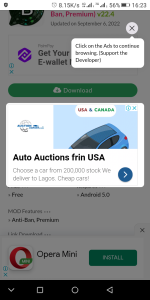
[Req] Blogger Pop Up force adclick

Pradzee

New member
Email Verified
Pls can you provide this pop up code
 

Attachments

  • 20230128-162324.png
    20230128-162324.png
    221 KB · Views: 93
<div class="popup" onclick="myFunction()">Click me!
<span class="popuptext" id="myPopup">Popup text...</span>
</div>
 
<div id = "popup" class = "hidden modal">

<a href="Post URL" target="_blank">

<image src=" image URL " alt=” ” > </a>

<h2> <p style="color:black;"> Post Title
<a href=" link ” target="_blank" >

</a> </p> </h2>

<div class="modal-footer">

<button type="button" class="btn btn-default" id='close' data-dismiss="modal">Close</button>

</div>

</div>


<style>

#popup {

display: inline-block;

opacity: 0;

position: fixed;

top: 20%;

left: 50%;

padding: 1em;

transform: translateX(-50%);

background: #fff;

border: 1px solid #888;

box-shadow: 1px 1px .5em 0 rgba(0, 0, 0, .5);

transition: opacity .3s ease-in-out;

z-index:99999;

}


#popup.hidden {

display: none;

}

#popup.fade-in {

opacity: 1;

}

</style>

<script>

window.onload = function () {

/* Cache the popup. */

var popup = document.getElementById("popup");


/* Show the popup. */

popup.classList.remove("hidden");


/* Fade the popup in */

setTimeout(()=>popup.classList.add("fade-in"));


/* Close the popup when a city is selected. */

document.getElementById("close").onclick = function () {

/* Fade the popup out */

popup.classList.remove("fade-in");


/* Hide the popup. */

setTimeout(()=>popup.classList.add("hidden"), 300);

};

};

</script>

 
<div id = "popup" class = "hidden modal">

<a href="Post URL" target="_blank">

<image src=" image URL " alt=” ” > </a>

<h2> <p style="color:black;"> Post Title
<a href=" link ” target="_blank" >

</a> </p> </h2>

<div class="modal-footer">

<button type="button" class="btn btn-default" id='close' data-dismiss="modal">Close</button>

</div>

</div>


<style>

#popup {

display: inline-block;

opacity: 0;

position: fixed;

top: 20%;

left: 50%;

padding: 1em;

transform: translateX(-50%);

background: #fff;

border: 1px solid #888;

box-shadow: 1px 1px .5em 0 rgba(0, 0, 0, .5);

transition: opacity .3s ease-in-out;

z-index:99999;

}


#popup.hidden {

display: none;

}

#popup.fade-in {

opacity: 1;

}

</style>

<script>

window.onload = function () {

/* Cache the popup. */

var popup = document.getElementById("popup");


/* Show the popup. */

popup.classList.remove("hidden");


/* Fade the popup in */

setTimeout(()=>popup.classList.add("fade-in"));


/* Close the popup when a city is selected. */

document.getElementById("close").onclick = function () {

/* Fade the popup out */

popup.classList.remove("fade-in");


/* Hide the popup. */

setTimeout(()=>popup.classList.add("hidden"), 300);

};

};

</script>

It's not same
 
<div id = "popup" class = "hidden modal">

<a href="Post URL" target="_blank">

<image src=" image URL " alt=” ” > </a>

<h2> <p style="color:black;"> Post Title
<a href=" link ” target="_blank" >

</a> </p> </h2>

<div class="modal-footer">

<button type="button" class="btn btn-default" id='close' data-dismiss="modal">Close</button>

</div>

</div>


<style>

#popup {

display: inline-block;

opacity: 0;

position: fixed;

top: 20%;

left: 50%;

padding: 1em;

transform: translateX(-50%);

background: #fff;

border: 1px solid #888;

box-shadow: 1px 1px .5em 0 rgba(0, 0, 0, .5);

transition: opacity .3s ease-in-out;

z-index:99999;

}


#popup.hidden {

display: none;

}

#popup.fade-in {

opacity: 1;

}

</style>

<script>

window.onload = function () {

/* Cache the popup. */

var popup = document.getElementById("popup");


/* Show the popup. */

popup.classList.remove("hidden");


/* Fade the popup in */

setTimeout(()=>popup.classList.add("fade-in"));


/* Close the popup when a city is selected. */

document.getElementById("close").onclick = function () {

/* Fade the popup out */

popup.classList.remove("fade-in");


/* Hide the popup. */

setTimeout(()=>popup.classList.add("hidden"), 300);

};

};

</script>
Permission
 
Top